Sunday, June 24, 2018

Five Chrome Extensions You Must Have!

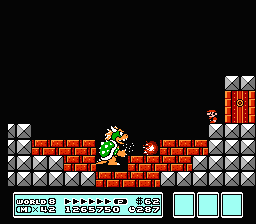
Image result for bowser super mario 3
In the multiple times I typed "browser", I typed "Bowser" first.  Have no fear,
Mario will defeat Bowser and show you how to improve your Chrome
experience! Image courtesy of
https://www.mariowiki.com/File:SMB3_Bowser_Battle.png
One of my favorite things about the Google Chrome browser is the ability to add extensions to improve productivity while surfing the web or putting together lessons, activities, etc.  These little programs range from ad blockers and shortcuts to websites, to URL shorteners and memory savers, and so much more.  If there is something that you think should be easier to do within the Chrome browser, odds are, the Chrome Web Store probably has something to address your wants and needs.  

Over the course of several years of using Google Chrome, I have amassed quite the collection of Chrome extensions.  Some of these extensions are ones that I absolutely use every day, such as AdBlock Plus, Pin Tab, and Reopen Closed Tab.  There are also extensions that I don't use very often, so I turn them off most of the time to save on memory and prevent the browser from bogging down, such as Cite This For Me and Google Tone.  To control my extensions, I use an extension (I know, right?) called Extensity to easily toggle extensions on and off.  

While I could drone on and on about all of the Chrome extensions I have connected to my account, there isn't time and it's really not necessary.  However, the following are five Chrome extensions that I think are a must-have for your everyday productivity.  

Image result for onetab logo
Image courtesy of www.one-tab.com
OneTab:  We all get into that situation where we have numerous tabs open in the browser.  Sometimes you're not even viewing a certain tab, but it's still open for when you need to see it, such as your email.  OneTab helps you to organize tabs and cut down on memory Chrome uses to run when so many tabs are open.  When clicking on the OneTab extension, it collapses all open tabs into a single tab with a list of URLs.  You can reopen tabs from the list one at a time, or you can restore all tabs with a single click.  OneTab allows you to name a set of websites and lock them so they open in a single tab every time you open Chrome.  You can also export a list of websites as the extension creates a unique URL of your list so it can be shared, perfect for sending students a list of websites for viewing during a lesson.  

I have two sets of websites saved in OneTab that I use on a regular basis.  One set that I titled Most Used is links to my email, Google Drive, Google Keep, and Google Calendar.  Another set of tabs that I have saved links to my master's coursework, with my school email, school Google Drive, and student portal.  I also have the options to create other lists when I need them.  
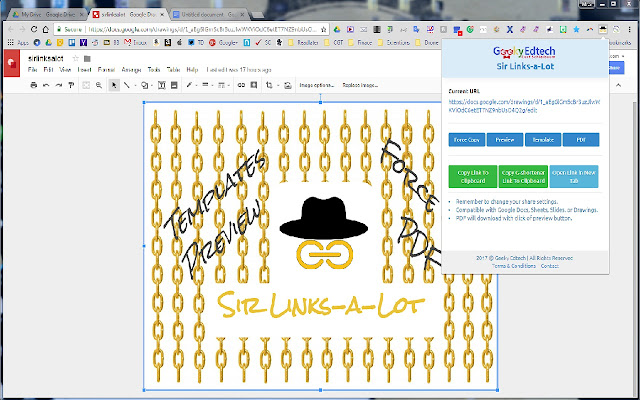
Image result for sir links a lot logo
Image courtesy of chrome.google.com
Sir Links-A-Lot:  One of the reasons why Google Drive and each of the Google productivity apps are so great is because you have the ability to share files with others.  Sometimes, you want to give people a copy of a file and give them editing rights, but you don't want them to edit your copy, so you use the file's URL to change it from "edit" to copy", forcing recipients to make a copy of it when they click on the link, which also takes out the "File - Make a Copy" step.  Sir Links-A-Lot makes this process quicker and easier but allowing you to simply click on the extension and create the force copy link.  However, Sir Links-A-Lots does more!  It allows users to not only create a force copy link, but also a preview link so recipients can see the document, a template link, and a .pdf link.  Once you have selected which of the four options you want to use, it allows you to copy the link to the clipboard, shorten the URL and copy it, and open the item in a new tab.  

Image result for anyonecanview logo
Image courtesy of www.alicekeeler.com
One thing that it does not do is change your shared settings.  You must still open up the setting and change them so people can access the force copy, template, etc.  The easiest way to that is to change the setting within the Docs, Slides, Sheets, or Drawings file to "anyone with the link can view."  If that is too much work for you, there is a Chrome extension called Alice Keeler's AnyoneCanView that will change the settings of a file in one click to anyone with the link can view (I guess this makes it six extensions you must have... bonus freebie for you!).

Image result for wakelet logo
Image courtesy of www.wakelet.com
Wakelet:  Wakelet is the program that I never knew I needed.  Wakelet allows users to curate content from the web into stories that are easier to organize and share.  After creating a Wakelet account, install the Wakelet extension and anytime you find something online that you think is worth saving and/or sharing, click on the extension and save it into a new collection or "wake".  You can save images, articles, and my favorite, tweets and Facebook posts.  Want others to contribute to a collection?  You can do that too!  I have already started to curate some great blog posts in a wake that I called Pro Dev.   You can see what I have thus far at http://wke.lt/w/s/6XTp9.

Image courtesy of chrome.google.com
Microsoft Office Online:  I have been using G Suite for Education apps for several years now.  For the most part, I don't open Microsoft Word, PowerPoint, etc. unless I absolutely have to, and even then, because Google allows you to download Docs into Word format, Sheets into Excel format, Slides into PowerPoint format, and any file into a .pdf, I haven't had much use for Office tools in the past few years.  There are a handful of things that Office tools can do that Google can't.  For example, tables are much easier to work within a Word document than a Docs file, and PowerPoint is more robust in a few ways than Slides, but it's not enough to stop me from using Google.

I recently started a master's program where I am required to submit my work in Office files and the student portal isn't 100% compatible with Chrome OS on my Chromebook, which I use about 75% of the time over my PC.  I wanted a way to be able to still use my Chromebook and work with Office files.  Microsoft offers the ability to use Office and OneDrive online and it syncs with the hard drive on my PC, saving any work that I do in Office and OneDrive online.  As nice as this is, there are a lot of steps and clicks to get to a file or open a new file when I want to get to work.  The Microsoft Office Online Chrome extension eliminates the multiple clicks and allows you to create a new Word, Excel, PowerPoint, etc. right from the extension.  You can also open OneDrive with a single click and a list of recent files will also appear from the extension.  If you have a file on your computer that isn't in OneDrive, you can upload it into Office online and open it in the browser with a click from the extension as well.  Don't have Microsoft Office installed on your computer?  Don't worry, you don't need to have Office installed since it all works within the Chrome browser.
Image courtesy of chrome.google.com
Save to Keep:  In my opinion, one of the most underutilized and underrated Google applications is Google Keep.  I wrote a post about Google Keep a few months back, touting the abilities and potential of this great tool.  While Keep is great for making lists, saving images, bookmarking websites, and so much more, it can be even better using the Save to Keep Chrome extension.  By clicking on the extension or right clicking on a website, you can not only save the link, but you can add notes about the page without having to navigate to a new tab, opening Keep, creating a note, copying the link, so on and so forth.  With one click, you can do it all!

Found an image that you want to hold onto?  Right-click on the image, click on the Google Keep extension option from the list and select Save Image.  From there, you can write notes, mark up the image, etc. within Keep.  Use the Keep notepad options in Google Docs, Slides, and Drawings to directly import notes and images that you save using the extension, saving you clicks, time, and based on my previous post, your sanity!

Like I stated previously, I could go on and on about various extensions that I use regularly.  I am always on the lookout for new ones as well.  What are some of your favorite Chrome extensions?  Share your thoughts on how they make your professional and personal life easier!  And if you happen to be at ISTE18 in Chicago, for the record, I am really jealous of you and I look forward to seeing the learning that is happening on Twitter, Facebook, blogs, etc.  Oh, and the pictures of the amazing food of the Midwest that I miss so much sometimes!

Until next time... 

Saturday, June 16, 2018

The Pieces Falling in Place

Going through the process of finding a job is nervewracking.  The last time that I went through the process of a move and a job hunt was when I graduated from college in 2005.  And while I remember that process being stressful, it wasn't as if I was unemployed at the time.  Was I employed doing something that I wanted to do for a long time or for the rest of my life?  By no means, but I was working fulltime at Applebee's and substitute teaching, and for where I was living at the time in Marquette, Michigan, I was actually making decent money.  However, decent money, if you are not content with what you're doing, doesn't mean much.  

A few months back, my wife, Mary, was accepted to grad school and after talking about it, we decided that we would move to Reno so she could pursue her master's in speech-language pathology.  Her program will be a little under two years, but she will not be working so she can concentrate on school, so it was imperative that I find a job.  The problem was, nothing was available for me in my licensed areas, so I had to be willing to either drive to other districts outside of Reno or find a position in special education while working on the requirements for licensure.  

The idea of teaching special education was intriguing to me.  I have always enjoyed working with students in a one-on-one setting or small group, something that a special education teacher gets to do on a regular basis.  Special education teachers also get to experiment with new ideas that could potentially reach students that may struggle in a traditional classroom setting.  But it wasn't just the intrigue of trying something new, I HAD to get a job, so I enrolled in a program through Western Governors University to take the credits necessary for licensure in special education.  

I had seen the commercials and knew a little about WGU, but the extent of what I knew was that it was a nonprofit school that was online.  I looked into their education programs and applied after learning that they had a special education degree, their tuition was very reasonable, and it was completely online (I already have two online degrees, I love the ability to work on my own time and I am self-motivated to get things done).  At first, I was interested in just taking the required classes for licensure, but when I learned more about WGU, it made sense to pursue the Masters in Special Education.  

Low tuition, all online, competency-based?
WGU is very unique in how they charge tuition and fees and how you move through your degree program.  WGU assigns classes to six-month terms, rather than semesters that are typically around four months long.  You could take the minimum number of classes during the term or you can take as many as you can and the tuition is the same.  My degree program is 31 credits and I am hoping to complete 18-20 of the credits during this first term.  How can you do that, you may be asking?  WGU is also unique in that you complete the classes on your schedule and because it is competency-based, with a pass/fail grade assigned (something that I have really become more interested in and passionate about lately, you will see a post on competency-based learning soon!), you can take the final exams when you are ready, not on a specific day at the end of the class.  For example, I just completed my first class in about 15 days.  I completed some of the activities with the class and realized that I knew most of what it was covering, so I requested to complete the final exam and writing prompt, passing both and finishing up the class.  I have now started my second class and hope to have it done by the end of June, finishing the first six credits of my program in a month.  

So, it's great that I got into a degree program and that WGU is a great fit for me, but how is the job hunt going?  I applied to a few positions in Reno, one in Carson City, and one in Lyon County.  Each of the positions was special education, with the exception of Lyon County, which was a technology coaching position that covered the 18 schools of the county (this one was my number one, even though it would have required driving up to 180 miles roundtrip on some days).  My anxiety began to build when I wasn't getting any responses back from the Reno schools and a notification that the position in Lyon County had been filled.  However, I did get a call from Carson City requesting if I would like to interview, which I gladly accepted.  

Conveniently, Carson City wanted to interview me after school had ended for me in Las Vegas and my family and I had planned to go to my parents' place near Redding, CA.  It was easy to pull into Reno for a night and go out to Carson for the interview and take care of some other things in Reno, like getting the kids registered for school.  So I prepped a sample lesson, cut my hair and put on a tie and headed out to interview at Carson High School.  

I don't get nervous for interviews.  My philosophy is to be confident, be honest, and the rest will take care of itself.  The panel for my interview asked me some very tough questions on some things that, frankly, I didn't know a lot about because I haven't worked as a special education teacher before.  However, I was very honest and stated that while I wasn't licensed in special education, I had been cleared by the district to complete the requirements if I was hired.  I answered questions to the best of my knowledge and experience and relied heavily on my classroom management, teacher-student relationship philosophy, and educational technology skills.  In my sample lesson, I demonstrated how Pear Deck can be a game changer in a classroom, especially with special education students because it provides a safe platform in which all students can participate, regardless of learning styles, fears, etc.  I left the interview and made the 25-30 minute drive back to Reno confident that I did well, but still preparing to apply for other jobs.  

As I got off the freeway when I got back into Reno, the phone rang, displaying a 775 number on the screen in the car.  For the non-Nevada folk out there, 775 is the area code that covers the entire state with the exception of Clark County, which is mainly 702 or 725.  Maybe I was being presumptuous, but I assumed that it may be Carson High School or the Carson City School District, or maybe a school in Reno.  I answered to hear the voice of the assistant principal that I had spoken with just 45 minutes before, asking if I would be interested in joining the team at Carson High School as the newest special education teacher! Like I have previously said, I felt confident that I did well in the interview, but I was floored that I received a call and offer so quickly.  I gladly accepted and told her how excited I was to become a Carson Senator!  

Over the next few weeks, I will be busy beyond belief, completing as much of my degree program as I can, traveling to Carson City for my new hire orientation, packing my belongings, and making the move to Reno.  My kids will be back to school, or in the case of my youngest, going to school for the first in pre-K, on August 6 and I will be completing new hire training the same week before reporting to my new school the following week and starting with students on August 20.  While I like to think I wasn't worried about getting a job, I do know that now that I have a job and everything is starting to come together for the move, a large weight has been lifted off of me and I can prepare for the next chapter.  And as for my wife, she has her class schedule for her own grad program and she is preparing for the next step of her profession and passion.  I couldn't be prouder of her and get to celebrate our 10th anniversary on June 21st!  

Enjoy your "time off", learn something new, watch some amazing soccer during the World Cup, and do something that you love!  

Until next time...